




Description
WinDyn5i Data Acquisition and Control System
Features a comprehensive solution available for dynamometers applications. Our feature-packed system includes all the tools you need to make a dynamometer a successful piece of your business. WinDyn5i includes powerful configuration and test editors that offer you complete, customized control of the dynamometer, the test cell and the tests you’re running. WinDyn5i offers over 500 channels allowing you to measure and analyze data to make your products better. Our advanced electronics data system can capture and display up to 100 lines per second so you’re sure to see the entire picture. The built-in data analysis tools let you see data in a way that makes sense, and like the rest of WinDyn5i, data analysis is user-configurable should you choose. Available for use with water brake, eddy current, AC, and other dynamometers
Features
Templates
A template is a WinDyn5i file that completely configures the dynamometer for testing. By using templates, you ensure that all tests are run in the same way, regardless of the operator. Templates configure the following:
- All channels being monitored (measured, constants, calculations, interpolations)
- Real-time data monitoring screens
- Safety limits to protect your engine or vehicle
- Test profiles (acceleration, step, steady state)
- Sensor calibrations for accurate and repeatable results
- Relay controls for test cell control (lights, pumps, fans, ignition, etc.)
- PID control loops
- Test specifications
Start Testing Quickly
WinDyn5i includes standard industrial test configurations to help you begin testing quickly. These standard settings are then customized on-site to match your specific application and testing requirements.
Customizable Templates
In addition to the standard configurations supplied from the factory, you have the freedom to tailor WinDyn5i to your preferences in any way you desire. Write custom test profiles, design custom screen groups, add a company logo to data plots, setup print preferences for graphs and tabular data, add additional sensors or integrate emissions equipment quickly and easily. The best part about WinDyn5i is its versatility, it comes fully loaded and ready to run all the standard tests you need, plus gives you the power to configure tests any way you prefer.
Pattern Runner – Included

Test Profiles
Automated one-touch tests that control every detail such as:
- Powering on pumps and fans
- Turning on ignition
- Turning on fuel
- Checking critical parameters
- Ending the test
- Stopping the engine
- Printing data or generating pass fail results
- Transmission durability tests on chassis dynamometers
- Automated chassis dynamometer tests with throttle actuators
- Break in
- Durability cycles
- Shifting transmissions
- Control hydraulics
Channel Editor
The channel editor gives you the power to create the custom test environment you desire. This powerful Windows® based editor allows you to define:
- Channel Definition (name, units, format, filtering, formulas, etc.)
Once you are happy with your custom configuration, it’s saved so the dynamometer can quickly be configured to your specifications before every test.
Safety Limits
Safety limits are designed to protect your engine and equipment from critical failures caused by conditions such as low oil pressure, high coolant temperature, or excessive exhaust temperature. These thresholds are fully user-configurable by parameter, setpoint, and response action, allowing precise control over shutdowns, derates, or alerts. Multi-stage RPM limits can also be defined based on operating conditions. All limits are actively monitored in real time, and if one is exceeded, a post-event logging feature captures data before and after the incident to support root cause analysis and corrective action.
Powerful, Customizable Report Generation
The built-in report generator gives you the flexibility to create detailed, customized reports tailored to your specific testing requirements. Whether you’re validating performance or documenting results, the system provides full verification of high-performing engines with clear, professional output.
Customize data tables and charts to display key test metrics, with any data channel, including:
- Horsepower
- Torque
- RPM
- Oil Temperature
- Oil Pressure
- Create reports that deliver the insights you need — clearly, accurately, and efficiently
Configurable Operator’s Workstation – Engine Dynos
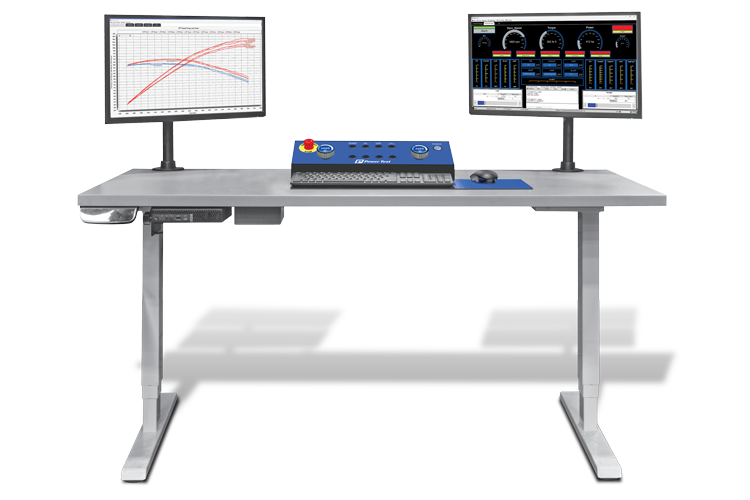
The new redesigned operator’s workstation gives you the ability to configure your workstation to meet your testing needs. The newly configured workstation offers enhanced desk design and layout as well as a new console design, allowing the operator control their work environment.
Hand Held Controller – Chassis Dynos
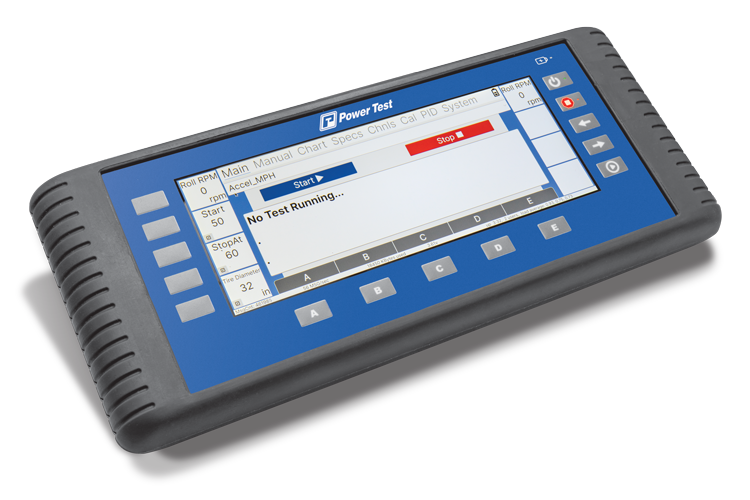
The hand-held controller is enclosed in a durable, impact-resistant enclosure and offers both wired and wireless compatibility. It comes equipped with a 9.3-inch IPS liquid crystal and touchscreen interface. The fourteen soft-keys are automatically labeled according to their function during each test. The display can present any of a hundred different measurements in real time, offering the operator prompts and options for conducting the test.
Seamless CAN Communication Integration
WinDyn5i comes equipped with standard CAN communication capabilities, including starter files and a compatible harness, allowing smooth integration with your ECM software. This enables dynamometer operators to easily sync with the ECM and access real-time test data.
With this feature, the ECM can efficiently prepare and transmit key information over the CAN network, streamlining communication and enhancing data visibility during testing.
Test Setup Tool
WinDyn5i offers a Test Setup utility allowing the user a more intuitive approach to adjusting settings within WinDyn. All settings can be saved to a WinDyn Preference file.